詳細は以下のリンクでご確認のほどよろしくお願いいたします。
カテゴリー: 日本ニュース
日本に関する情報源
-

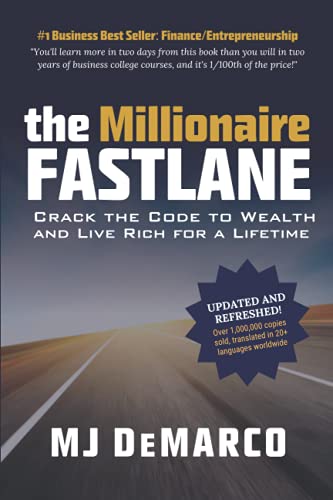
Millionaire Fastlane
Idea to Fastlane: 1) Control your own business, 2) Leverage it (Time is sold for money, this is not Leverage); 3) Hard work doesn’t feel like work, in fact I enjoy it. Felt Rich and happy. 4) Automation and Process—> Money Tree grows money (the money rolls in) –> Fruit bearing money tree that requires only a few hours to flower it.
The book starts with questioning what is the True Wealth?
According to the Author, the True Wealth is not defined by material possession: Money or Stuffs. 3Fs are the fundamental of True Wealth: Family: Relationship, Fitness: Health and Freedom: Happiness.Normal is the modern day of slavery. Society’s Corrupted Definition of Wealth–> Normal is corrupted.
Misuse Money and Money will Misuse You.He goes to question: Money can’t buy happiness? Is it true? Used properly, In reality, Money buy freedom which is one fundamental of happiness.
How about taking a few time to review your business: whether it is a right Fastlane Roadmap / Path to Wealth or not?
According to the book titled: “Millionaire Fastlane”, the millionaire right business roadmap toward the WEALTH must follow the “LAW OF AFFECTION” that follow the 5 Commandments:
- COMMANDMENT OF CONTROL, “C” Commandment
- COMMANDMENT OF ENTRY, “E” Commandment
- COMMANDMENT OF NEED, “N” Commandment
- COMMANDMENT OF TIME, “T” Commandment
- COMMANDMENT OF SCALE, “S” Commandment
In Summary, it is called, “CENTS” Framework — don’t start a business to pay your bills, start one to set yourself free– both with time and money.
By M.J. DeMarco, the author, there are 3 different maps and paths used by people to achieve financial success. (1) The Sidewalk, (2) The Slow Lane, (3) The Fastlane (Choose Unlimited Controllable Gain (UCG); Have Your Own Business; Transform Your Lifestyle; Choose the Rapid Wealth Creation)
Other wisdoms of the book:
* Wealth is not the Road, it is a journey. That is to say, what is matter is not the final destination, but the whole process of reaching and enjoying it…
* Deem WEALTH as a construction work, as selling many products_ instead of thinking of yourself as a consumer, build the mindset that you are a producer, and always keep it in the foreground.
* Even if you have found a way, but if you never think it right way, it never turn into the Fastlane.
* You can come up with an idea of a good solution that has market potential and can make you rich, however, this will happen only if you move other pieces of the game:
** Project Execution;
** The Marketing;
** The service or consumer service;
** Your Product;
** The ideas.
* Execution is the King; and the ideas are the pawns.
* Burn the business plan; ignite the execution.
* Paulo Vieira, “Enrichment Factor”: the enrichment journey is made up of peaks and valleys, so be prepared and willing not to stop midway_ never give up make you millionaire.
* Lynda Gratton, “The 100 Year Life”: people must move from 3 stages: education, work, and retirement – to a multiple-stage life, that requires flexibility, and change in the way time is used.
* Jill Schlesinger, “The Dump Smart People Do With Their Money”: people should not invest their money in what they don’t know.
* Stop thinking like an employee and at the end of his life will bear the fruits of his efforts.
* Work with purpose and passion to stay motivated regardless of difficulties.
* Wealth does not depend on formulas, but requires beliefs, lifestyle, and the processes that you define.
* Create product Solutions that ensure process automation and income that is not dependent on your workforce.
* Stop planning and execute! Use execution learning to improve planning, creating an efficient and productive cycle.
-

Startup’s Kick-Off!!!
STARTUP’S DEPARTURE POINTS : Looking out for Ideas
- PERSONAL PERSPECTIVE
- Based on Personal Belief or Personal Know-how such as Personal Viewpoint, Intention, Principle, Feeling, Emotion, Experiences, etc…
- Market/Social Axis
- Based on Business Environment, Competitor’s Move, etc…looking out for Business Opportunity, Feasibility, Potential
Continued from Previous Slide, about Startup Book…
- Originated from Practical Case/Case Study (PAST)
- Information Collection
- Look into Foreign Companies which are Good Practice/Success Story and Apply it in Local Context
- Read Local Publications related to the field
- Originated from Problem/Inconvenience (PRESENT)
- Current Existing Service –> Standing on problem perspective –> What if we do it this way, isn’t it more convenient?
- Thorough examine the user’s behavior not just words, but action–> Indirect Experience Style
- Originated from the Change in Social Structure (FUTURE)
- Approach to Forecast Future Needs or Timing of Structural Change (A Little hard)
- ‘73 & ‘79 Oil Shock, Tōhoku earthquake and tsunami, 2019 Covid-19 —> Social Structural Change —> New Services, etc…
- Approach to Forecast Future Needs or Timing of Structural Change (A Little hard)
Overall, BRAiNSTORMING is the Basic Method.
- PERSONAL PERSPECTIVE
-
Convert Number to Words Automatically…
May 4th, 2021
We can convert Number to Word easily with the following website:
https://www.calculatorsoup.com/calculators/conversions/numberstowords.php
I tried to search for the function to print the amount in number to WORDS automatically in Quickbooks, but it seems that we can not print automatically. We can only add the Message box and write the amount in words by ourselves.
Therefore, the above website may be helpful to avoid error in writing.
Hope it is helpful 🙂 -
Startupを読むべき本?
こちらの本はスタートアップにとって、読むべきだと思います。最初段階から、どうやってアイディアを導き出すのか?という詳細に基礎から書いてあります。フォーマットは書籍、Kindleとオーディオブックがあります。
以下のアマゾンからご購入可能です。
-
PC Troubleshooting (PCトラブルシューティング)
May 4th, 2021
Q1 .តើត្រូវធ្វើយ៉ាងដូចម្តេច ដើម្បីអោយExcelបម្លែងតម្លៃជាលេខ ទៅជាអក្សរ ដោយស្វ័យប្រវត្តិ?
Q1 . How to convert the amount in number(342) to word (Three Hundred Forty Two) automatically in Excel?
A- Follow the instructions below:
1) Use the keyboard shortcut, Alt + F11 to open the Visual Basic Editor (VBE).
2) Click the Insert tab, and click Module.

3) Copy the following lines of code.
________________________________________________________________
Option Explicit
‘Main Function
Function SpellNumber(ByVal MyNumber)
Dim Dollars, Cents, Temp
Dim DecimalPlace, Count
ReDim Place(9) As String
Place(2) = ” Thousand “
Place(3) = ” Million “
Place(4) = ” Billion “
Place(5) = ” Trillion “
‘ String representation of amount.
MyNumber = Trim(Str(MyNumber))
‘ Position of decimal place 0 if none.
DecimalPlace = InStr(MyNumber, “.”)
‘ Convert cents and set MyNumber to dollar amount.
If DecimalPlace > 0 Then
Cents = GetTens(Left(Mid(MyNumber, DecimalPlace + 1) & “00”, 2))
MyNumber = Trim(Left(MyNumber, DecimalPlace – 1))
End If
Count = 1
Do While MyNumber <> “”
Temp = GetHundreds(Right(MyNumber, 3))
If Temp <> “” Then Dollars = Temp & Place(Count) & Dollars
If Len(MyNumber) > 3 Then
MyNumber = Left(MyNumber, Len(MyNumber) – 3)
Else
MyNumber = “”
End If
Count = Count + 1
Loop
Select Case Dollars
Case “”
Dollars = “No Dollars”
Case “One”
Dollars = “One Dollar”
Case Else
Dollars = Dollars & ” Dollars”
End Select
Select Case Cents
Case “”
Cents = ” and No Cents”
Case “One”
Cents = ” and One Cent”
Case Else
Cents = ” and ” & Cents & ” Cents”
End Select
SpellNumber = Dollars & Cents
End Function
‘ Converts a number from 100-999 into text
Function GetHundreds(ByVal MyNumber) As String
Dim Result As String
If Val(MyNumber) = 0 Then Exit Function
MyNumber = Right(“000” & MyNumber, 3)
‘ Convert the hundreds place.
If Mid(MyNumber, 1, 1) <> “0” Then
Result = GetDigit(Mid(MyNumber, 1, 1)) & ” Hundred “
End If
‘ Convert the tens and ones place.
If Mid(MyNumber, 2, 1) <> “0” Then
Result = Result & GetTens(Mid(MyNumber, 2))
Else
Result = Result & GetDigit(Mid(MyNumber, 3))
End If
GetHundreds = Result
End Function
‘ Converts a number from 10 to 99 into text.
Function GetTens(TensText) As String
Dim Result As String
Result = “” ‘ Null out the temporary function value.
If Val(Left(TensText, 1)) = 1 Then ‘ If value between 10-19…
Select Case Val(TensText)
Case 10: Result = “Ten”
Case 11: Result = “Eleven”
Case 12: Result = “Twelve”
Case 13: Result = “Thirteen”
Case 14: Result = “Fourteen”
Case 15: Result = “Fifteen”
Case 16: Result = “Sixteen”
Case 17: Result = “Seventeen”
Case 18: Result = “Eighteen”
Case 19: Result = “Nineteen”
End Select
Else ‘ If value between 20-99…
Select Case Val(Left(TensText, 1))
Case 2: Result = “Twenty “
Case 3: Result = “Thirty “
Case 4: Result = “Forty “
Case 5: Result = “Fifty “
Case 6: Result = “Sixty “
Case 7: Result = “Seventy “
Case 8: Result = “Eighty “
Case 9: Result = “Ninety “
End Select
Result = Result & GetDigit(Right(TensText, 1)) ‘ Retrieve ones place.
End If
GetTens = Result
End Function
‘ Converts a number from 1 to 9 into text.
Function GetDigit(Digit) As String
Select Case Val(Digit)
Case 1: GetDigit = “One”
Case 2: GetDigit = “Two”
Case 3: GetDigit = “Three”
Case 4: GetDigit = “Four”
Case 5: GetDigit = “Five”
Case 6: GetDigit = “Six”
Case 7: GetDigit = “Seven”
Case 8: GetDigit = “Eight”
Case 9: GetDigit = “Nine”
End Select
End Function
_________________________________________________________________
4) Paste the lines of code into the Module1 (Code) box.

5) Use the Keyboard shortcut, Alt + [Q] to return to Excel file.
** After That, How to Use it?
à 1) Type the formula =SpellNumber(A1) into the cell where you want to display a written number, where A1 is the cell containing the number you want to convert. You can also manually type the value like =SpellNumber(22.50).

2) Press Enter to confirm the formula. That’s it! You will see the amount written in words automatically.

3) Save as Excel Macro-Enabled Workbook (.xlsm) to keep your file in its current format. To do that, follow the instructions below:
a) Click File > Save As.
b) Click the Save as type drop-down menu, and selct Excel Macro-Enabled Workbook.
c) Click Save.