
Have you ever encountered this kind of Error (Error Code: 80090016) with Microsoft Outlook, when you changed the Login Password of your account?
It is Outlook 365 Trusted Platform Module Security Error.
Solution: Deleting the Contents of Ngc Folder. How? Just follow the procedures below:
- Find the path below:
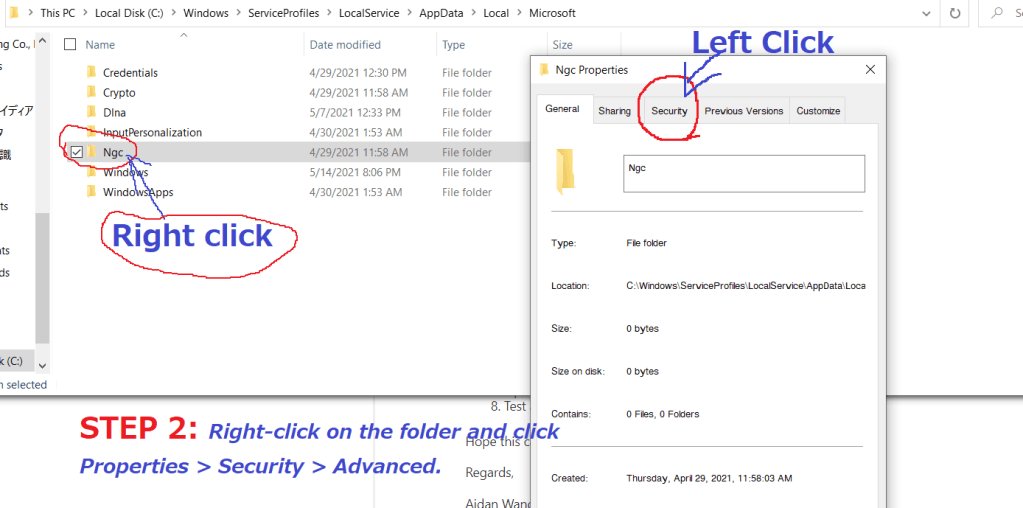
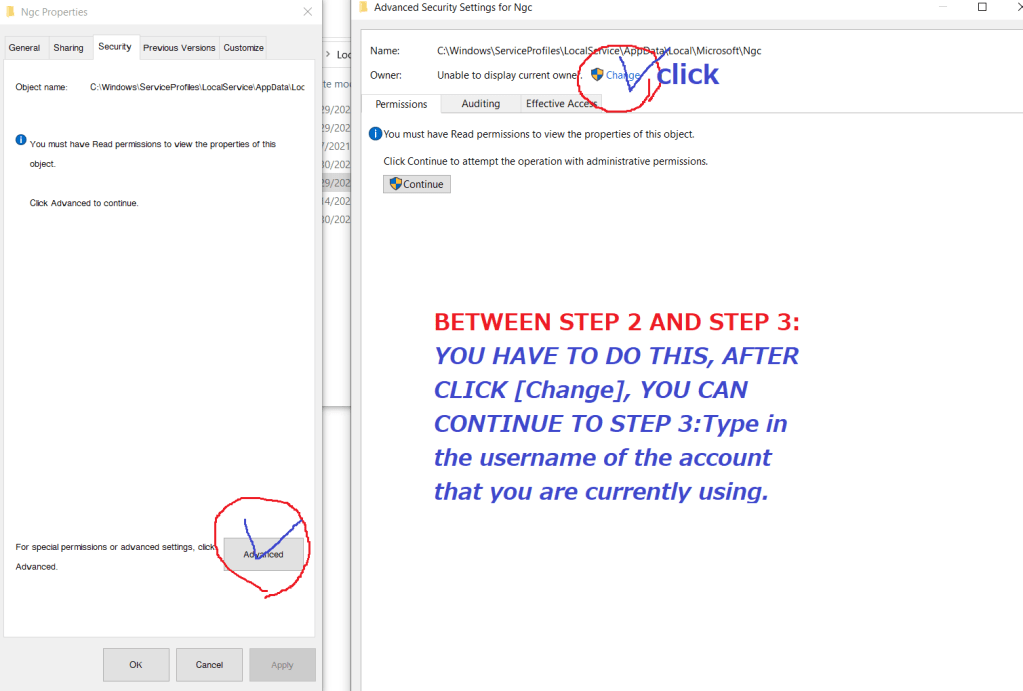
C:\Windows\ServiceProfiles\LocalService\AppData\Local\Microsoft\ - Take over ownership of Ngc folder. Right-click on the folder [Ngc] and click Properties > Security > Advanced.
- Type in the username of the account that you are currently using
- Check names and click OK.
- Make sure that the “Replace owner on subcontainers and objects’ box is checked.
- Click Apply and hit OK.
- Open up the folder [Ngc] folder and delete all the contents of the folder.
- Turn Outlook, it would work fine.
PLEASE CHECK THE ATTACHED SCREENSHOTS FOR BETTER UNDESTANDING.
 日本語プロ通訳・翻訳チーム
コメントを残す